25+ Best Sims 4 Winter Loading Screens for a Cozy Seasonal Aesthetic

Winter is the perfect time to refresh your Sims 4 game with atmospheric loading screens that feel warm, festive, and perfectly seasonal. You can get snowy mountain views, frosty townscapes, soft holiday themes, or minimalist winter palettes, which instantly set the tone the moment your game boots up.
This collection of Sims 4 winter loading screens features Maxis Match–friendly options as well as more detailed, stylized picks, all designed to give your gameplay a colder, cozier feel. They’re lightweight, easy to install, and change your game’s UI to match the season.
If you want to customize even further, you can also browse our Sims 4 CAS Backgrounds guide for more aesthetic upgrades.
Disclaimer
You can only use ONE custom loading screen in The Sims 4 at a time. Having multiple loading screens in your Mods folder will cause conflicts or prevent the game from loading properly. Before adding a new winter loading screen, make sure to remove or delete any previous loading screen mods you installed. Custom loading screens are purely visual and won’t affect gameplay, save files, or performance as long as you follow this rule.
Looking for the perfect CC for your Sims?
Try our Free Sims 4 Mod & CC Finder to discover thousands of mods instantly. Search by category, creator, or style to find exactly what you need!
How to Download and Install Sims 4 Winter Loading Screens
If you’re new to using loading screens, follow these installation steps. Since they modify the UI, you must install them correctly to avoid conflicts.
- Download the loading screen file
Click the creator’s download link and save the .package file to your computer. Some creators offer multiple versions. Make sure you only pick one. - Locate your Mods folder
Go to:
Documents > Electronic Arts > The Sims 4 > Mods - Remove any old loading screen mods
You can only have one installed at a time. Delete or move any previous loading screen .package files before adding the new one. - Place the new loading screen into your Mods folder
Drag the .package file into the Mods folder. Loading screens don’t need subfolders and shouldn’t be placed deeper than one folder level. - Enable mods in your settings
Open The Sims 4, go to Game Options > Other, and ensure:
• Enable Custom Content and Mods
• Script Mods Allowed (not required for loading screens, but good to check)
Restart the game to apply changes. - Load your game to test the new screen
Your winter loading screen should appear immediately as the game loads. If it doesn’t, check for conflicting UI mods or multiple loading screen files.
Best Sims 4 Winter Loading Screens for 2025
Cozy Winter Loading Screens
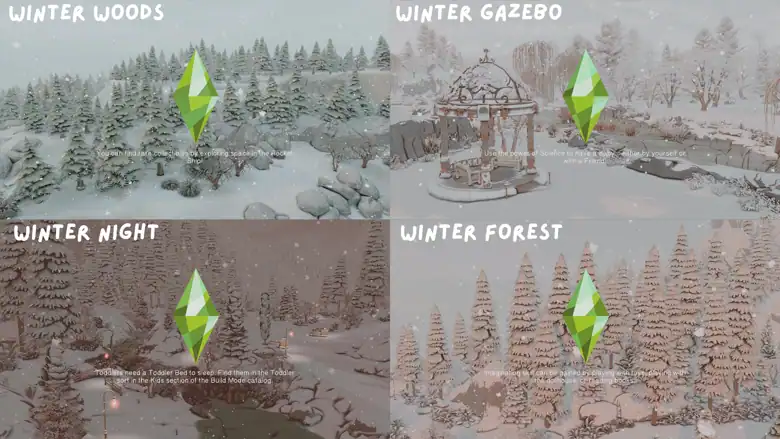
This set of Cozy Winter Loading Screens is a must-have in your 2025 gameplay. They come in four variations:
- Winter Woods
- Winter Gazebo
- Winter Night
- Winter Forest
The creator designed this set to pair beautifully with the ghade preset Ellcrze Reshade for an even softer, cozier effect. If you want consistent visuals, you can use that preset alongside your chosen loading screen.
RELATED POST: 21+ Best Sims 4 GShade Presets for Gorgeous Graphics
Winter Set of Opening and Loading Screens

For those who want cozy winter loading screens, grab this frosty pair. It has a light, calm, and Maxis-Match-friendly design, perfect for festive gameplay.
Before starting the game, delete your avatarcache and localthumbcache files, especially for the opening screen version. If you prefer a faster startup, you can pair it with a No Intro mod to remove the EA intro video.
Snow City Loading Screens

Ashlegacies has released a few Sims 4 winter loading screens this year, and these Snow City Loading Screens are my go-to. They come in six different versions, and they’re all pink-themed.
Note that the Plumbob Recolors aren’t included in this download, so be sure to download those separately. Also, to unlock this post for download, be sure to subscribe to the creator’s Patreon.
Loading Screen Collection
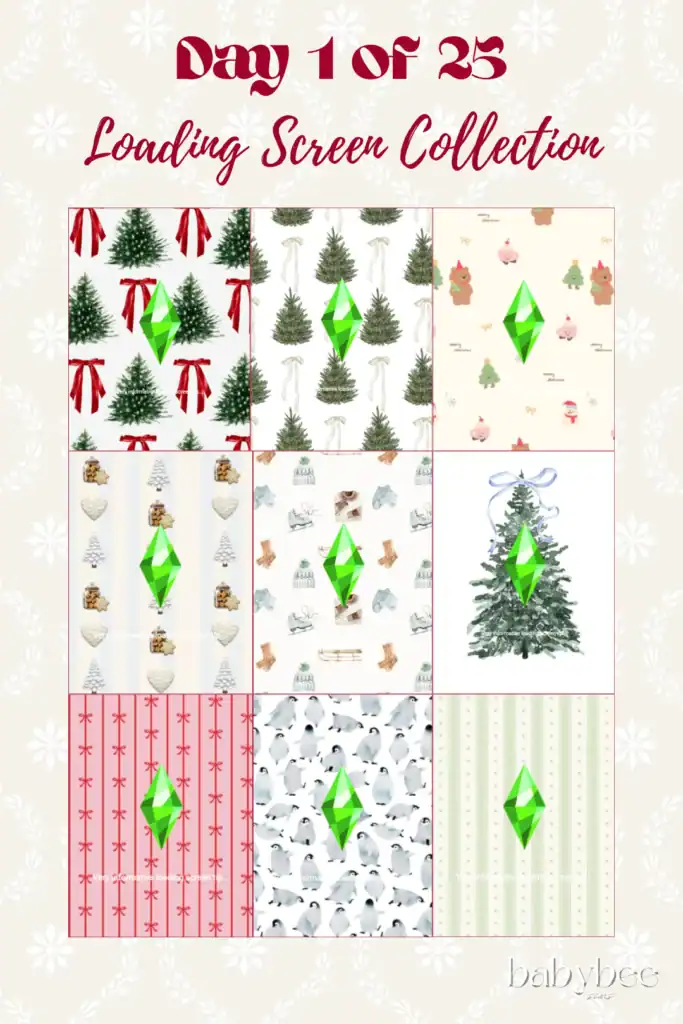
The Loading Screen Collection contains 9 custom backgrounds for winter, Christmas, and holiday storytelling. Each loading screen features classic festive decorations, like Christmas trees, stockings, and ribbons.
Choose one loading screen to add to your mods folder and load up the game.
Holiday Loading Screens

This adorable Holiday Loading Screen collection is designed with a soft, cozy aesthetic, muted pastel tones, and festive Snoopy artwork. There are 7 different designs, each capturing a gentle Christmas vibe.
The minimalist background keeps the screen uncluttered while still giving you a warm seasonal feel every time your game loads. Reshade was used for the creator’s preview images, but you can use the loading screens themselves without it.
For matching visuals, you can also download the coordinating plumbob recolours linked here.
Christmas Loading Screen Collection

The Christmas Loading Screen Collection transforms your game into a winter wonderland with soft lighting, frosted branches, and beautifully wrapped presents. The pack contains 18 unique versions, each with its own festive aesthetic.
Pick a mood that fits your holiday gameplay and add the loading screen to your mods folder.
For an even more personalized look, consider pairing it with Pinkishwrlds’ plumbob recolours, which you’ll find here and here. They complement Christmas visuals perfectly and make your loading screen feel more cohesive.
Falling Snow – Animated Winter Loading Screen

Designed by SimMattically, this is one of the best Sims 4 winter loading screens to add to your festive gameplay. It adds a soft, drifting snowfall effect across your game, creating a peaceful winter atmosphere the moment The Sims 4 starts up.
You’ll find four color variants:
- Silver
- Sunset
- Evergreen
- Evening
This loading screen comes with a matching white-toned plumbob, which will override any plumbob replacement you already have installed.
RELATED POST: 17+ Best Sims 4 Animations Packs, Mods, and Downloads for Ultimate Realism
Opening Screen Override and Loading Screen

Add this Christmas-themed loading screen to your festive gameplay this December. The deep red background topped with bold, detailed snowflakes gives your game a classic winter feel from the very first frame.
Before launching the game, delete your avatarcache and localthumbcache files, as this ensures the new startup screen appears correctly. For faster loading and a smoother startup, you can pair it with a No Intro mod to remove the EA intro movie.
Snowflake Loading Screen
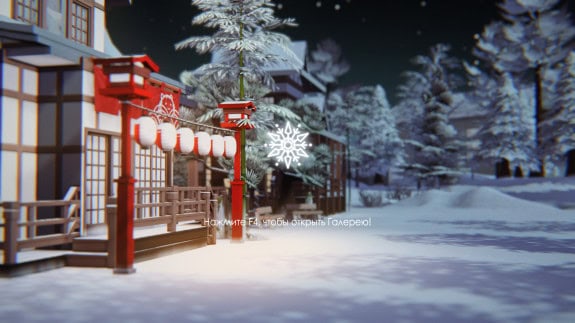
The Snowflake Loading Screen set is a collection of atmospheric loading screens designed to capture the quiet beauty of a winter night. Available in four variations, these Sims 4 winter loading screens place your Sims world in the middle of softly lit winter woods.
The snowy landscape, blurred depth-of-field, and gentle lantern glow create a serene winter forest ambiance every time your game loads. A custom animated snowflake replaces the plumbob, adding a delicate seasonal touch.
Christmas TS4 Loading Screen

Bring a festive pop of color to your game with the Christmas TS4 Loading Screens. They’re designed with bright red ornaments, frosted pine branches, and a soft winter glow.
You’ll find six different variations, each featuring subtle changes in lighting and decoration, so you can choose the mood that suits your gameplay.
RELATED POST: 54+ Best Sims 4 Christmas CC: Festive Downloads for Your Holiday Cheer
Christmas Aesthetic Set
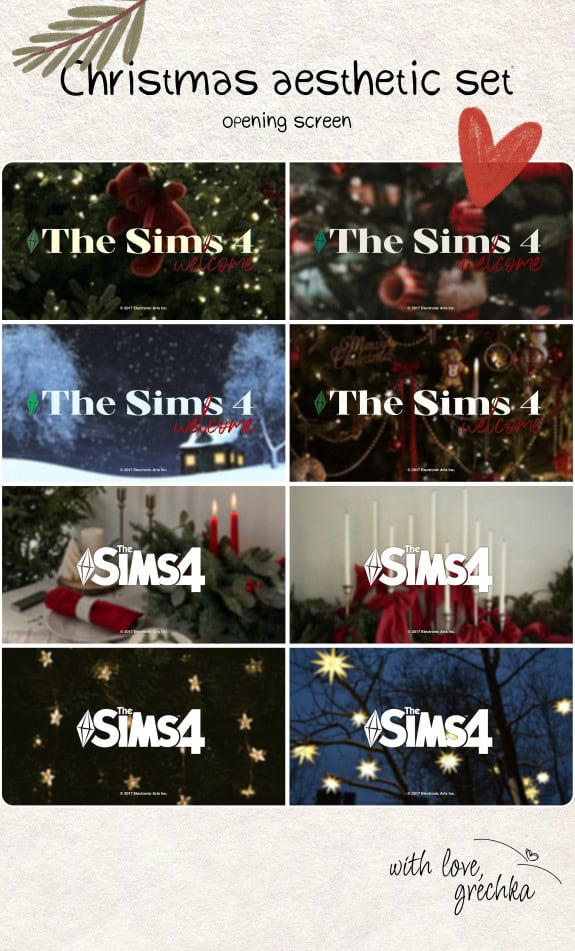
This Christmas Aesthetic set contains multiple Xmas-themed screens for your UI. These opening screens have a warm, festive look inspired by classic holiday décor. Think cozy tree ornaments, candlelit arrangements, snowy cottage scenes, and twinkling star lights.
Since each screen has its own mood, choose a style that best matches your seasonal gameplay. Scroll down to the bottom of the post to find all the opening screens.
Cozy Christmas Loading Screen

If you love cozy, lo-fi vibes, get this Cozy Christmas Loading Screen. It brings warm, relaxing holiday vibes to your game. This high-quality loading screen has been tested in-game and is designed to work smoothly on high settings.
It’s one of the few Sims 4 winter loading screens with crisp texture and detailing.
Winter Loading Screen and Main Menu Set and Loading Screen
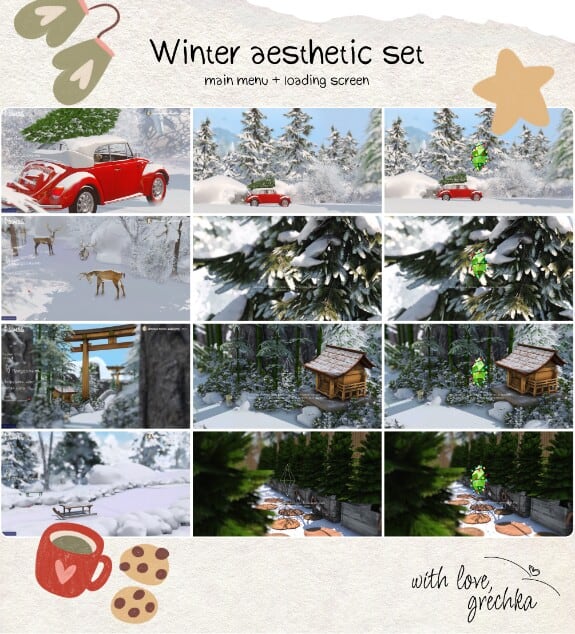
Transform your Sims 4 entire UI with this pack of loading screens and main menu overrides. You’ll find multiple winter scenes, from snow-covered forests and cozy cabins to a deer wandering through frosty paths, and charming outdoor views.
The creator built this menu using the minimalist main menu redesign by vyxated, so to match the preview exactly, you’ll need to install the vyxated-MainMenu-RemoveALLClutter.package file. Place it in your menu replacement folder and add a “!” at the beginning of the filename so it loads first.
Without this clutter-removal file, your menu will still show the usual EA UI elements such as the family photo, buttons, and banners.
Holiday Opening Screen Main Menu Override

Another stunning Sims 4 winter loading screen to add to your game is this one by SEREN. It’s festive, fun, and adds the right amount of holiday cheer to your game.
To download this loading screen, subscribe to the creator’s Patreon first.
Holiday Loading Screens
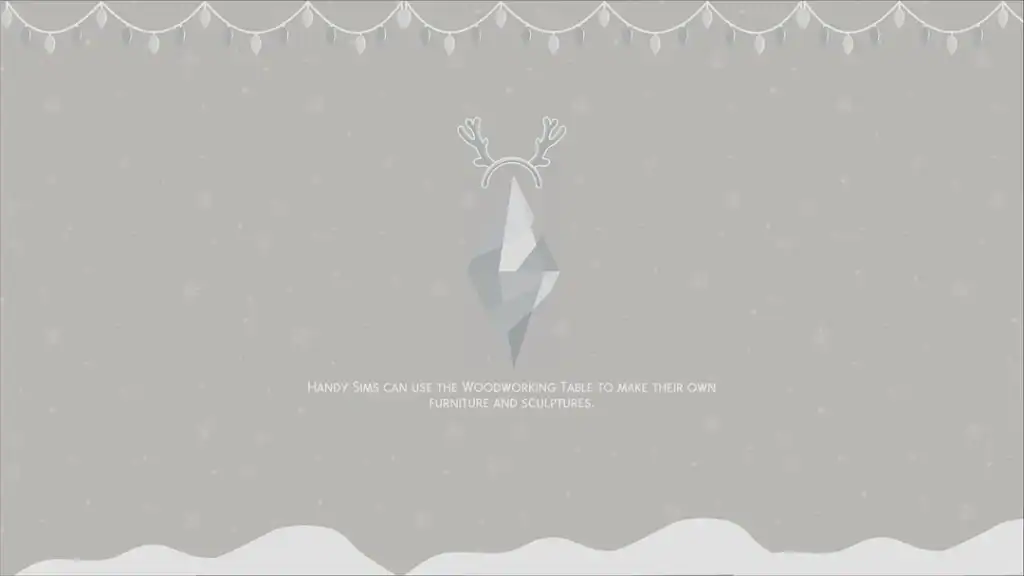
These Holiday Loading Screens by pinkishwrld are cute seasonal backgrounds with soft pastel designs, falling snow, and plumbobs dressed in festive accessories. The collection
- 2 light blue loading screens: one with antlers and one without, designed to pair with the light blue plumbob.
- 2 pink loading screens: one with a Santa hat and one without, compatible with the hot pink or light pink plumbob.
- 1 red and green loading screen: ideal for pairing with the darker green plumbob.
- 1 brown reindeer loading screen: works perfectly with the beige or brown plumbob.
- 1 red plumbob recolor: recommended for use with Annasiims’ Winterfest screens or Vixonspixels’ 12 Days of Simsmas set.
- 2 new plumbob recolors: a darker green and a holiday red.
Choose one loading screen at a time, install it in your Mods folder, and pair it with one of the coordinating plumbobs for the full effect.
Xmas Loading Screen

For those who love vibrant loading screens for their game, grab this pack designed by AstrooStudioz. You’ll find multiple backgrounds, including purple, blue, white, red, and pink.
Each winter loading screen has a bold color theme, which makes it stand out from traditional red-and-green designs. I recommend using these objects to give your UI a more stylized and modern festive look.
Christmas Loading Screen
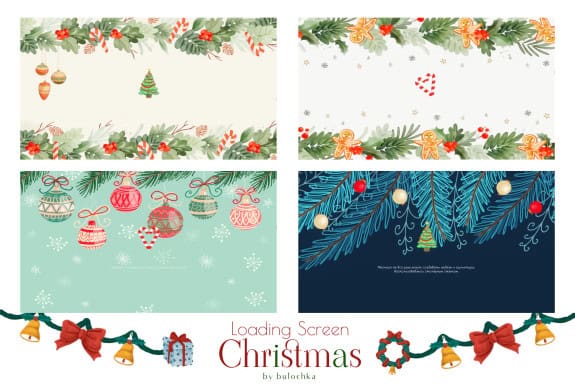
If you want a wide range of Sims 4 winter loading screens to choose from, get this set. It contains four illustrated winter designs filled with festive details like pine branches, gingerbread cookies, ornaments, snowflakes, and candy canes.
Choose one that suits your aesthetic and add it to your mods folder.
Winterfest Loading Screens
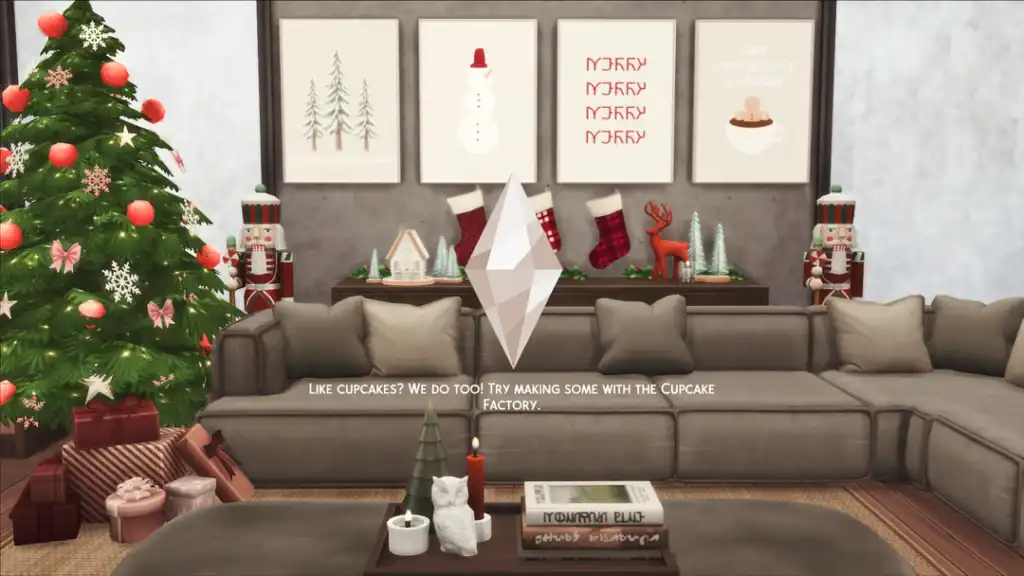
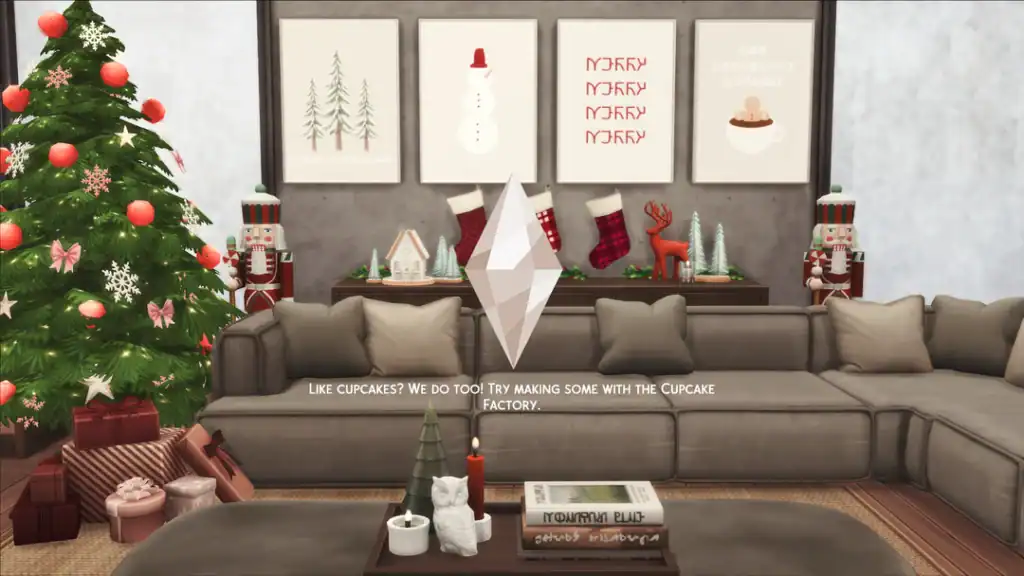
Winterfest Loading Screens are warm, cozy holiday backdrops with beautifully styled interiors, soft lighting, festive décor, and a neutral-toned plumbob. You’ll find four variations, each featuring stockings, nutcrackers, a decorated tree, wrapped gifts, and holiday art prints, all creating a calm, modern Christmas aesthetic the moment your game loads.
To ensure compatibility with the Life and Death EP update, the creator recommends downloading this loading screen plumbob fix. The loading screens also pair perfectly with pinkishwrld’s plumbob recolors.
Cozy Christmas Fireplace & Window Loading Screens
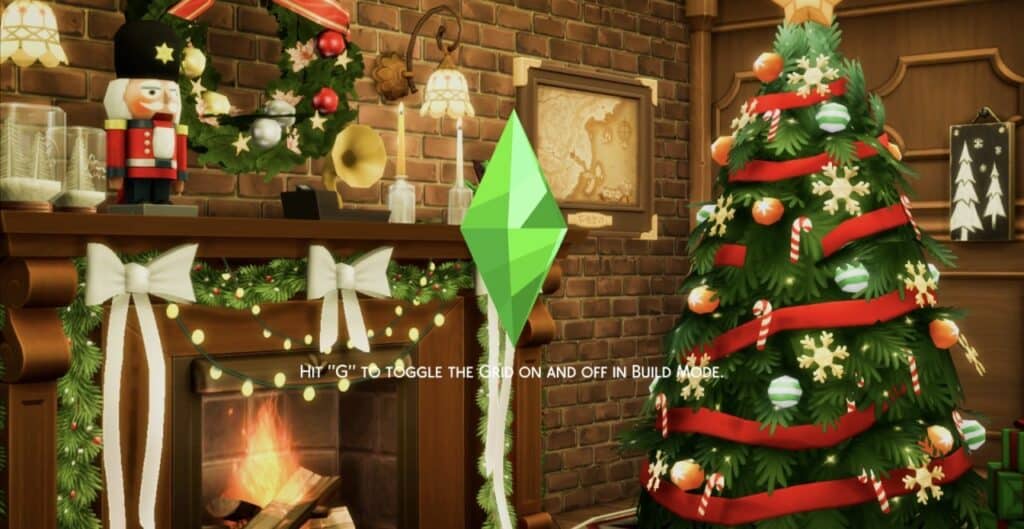
Download: Cozy Christmas Fireplace & Window Loading Screens
This base-game compatible set contains two loading screens:
- A glowing fireplace trimmed with garlands, bows, and lights
- And a festive window view styled with classic holiday décor.
Download either the Fireplace or Window version, place the file in your Mods folder, and remove any previous loading screen mods for proper functionality.
Winter-Themed Loading Screens
Created by Caradriel, these Winter-themed Loading Screens were captured in Brindleton Bay, and they showcase snowy forests, icy rivers, and serene night landscapes. You get five different variations, all of which give your game a calm and immersive seasonal look.
Note that these loading screens function as an override, meaning they’ll replace the default EA screen. Be sure to keep only one loading screen in your Mods folder at a time to avoid conflicts. If you prefer a tropical alternative, the creator also offers a Sulani version.
Aesthetic Winterfest

This second part of the Aesthetic Winterfest collection contains soft, minimal loading screens inspired by delicate winter greenery and classic holiday colors. Due to the simple neutral background, these backdrops are perfect for creating a clean and elegant Winterfest aesthetic.
You’ll find four different swatches of these Sims 4 winter loading screens. Be sure to download this loading screen plumbob fix to ensure compatibility with The Life and Death EP.
Winter Loading Screen Pack
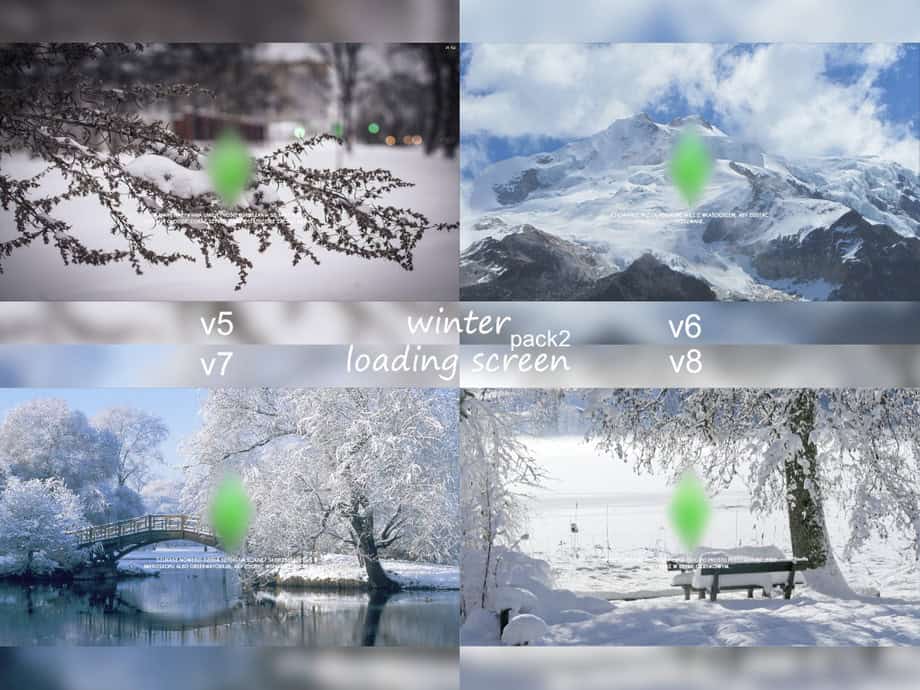
For those who prefer nature-focused backdrops, I recommend this Winter Loading Screen Pack. It contains five different designs, each capturing a different kind of snowy landscape. You’ll get frosted branches, icy mountain peaks, peaceful lakeside bridges, and quiet park benches.
All the loading screens in this pack are compatible with the base game. This is part 1 of the creator’s collection – here’s a link to Part 2.
Christmas Mood Board Loading Screen

The Christmas Mood Board Loading Screen is a scrapbook-style backdrop with a warm, atmospheric design. It has a handcrafted feel, perfect for Simmers who love a nostalgic, homey Christmas vibe.
You get everything from gingerbread houses and wreaths to candles, ribbon bows, Christmas lights, and snowy winter textures.
Christmas Loading Screen Set

The Christmas Loading Screen Set is a sweet and playful collection featuring gingerbread characters, frosted cookies, candy canes, bows, and winter motifs illustrated in a warm, cozy palette. The set includes three swatches, each offering its own variation of this cute cookie-themed design.
If you want a fun, whimsical holiday aesthetic instead of a traditional one, get this pack. It’s one of the best Sims 4 winter loading screens you can add to your gameplay.
Winter Temple Loading Screens

The Winter Temple loading screens transform your game into a serene, pastel winter landscape inspired by traditional Japanese architecture. Think snow-covered bridges, wooden temples, calm, reflective waters, and pink winter foliage.
There’s a total of six screens, all designed with a tranquil, atmospheric look. Plumbob recolors aren’t included in this set, but the creator recommends using the beautiful recolors from PinkishWrld for a cohesive look.
CottageCore Holiday Collection Loading Screens

This CottageCore-inspired Holiday Collection contains four loading screens, including:
- Elf Wreath
- Hohoho
- Bunnytree
- Troublemaker
Each loading screen has its own cozy cottage-core twist. This set also pairs beautifully with pinkishwrld’s plumbob recolors, which the creator used and highly recommends for a cohesive look. This collection is fully compatible with The Sims 4 update 1.111.
FAQ: Sims 4 Winter Loading Screens
How do I install a winter loading screen in The Sims 4?
Download the .package file, place it in your Mods folder, and remove any previous loading screen mods. Then restart your game. Only one loading screen can be installed at a time.
Why is my custom Sims 4 winter loading screen not showing up?
This usually happens when multiple loading screen files are installed or when CC and Mods aren’t enabled in Game Options. Remove duplicates and restart the game.
Do winter loading screens affect game performance?
No. Loading screens are purely visual and won’t change gameplay, loading times, or save file behavior.
Can I use a loading screen with another UI mod?
Yes, as long as both mods don’t modify the same UI elements. If you use a mod that changes the loading bar style or loading text, you may need to test compatibility.
Are Sims 4 loading screens base-game compatible?
Yes. Loading screen replacements work with the base game and do not require any expansion packs.
Can I switch loading screens whenever I want?
Absolutely. Just delete the old .package file and replace it with a new one. Only keep one active at any time.
Do these winter loading screens work with both Maxis Match and Alpha gameplay styles?
Yes. The style doesn’t affect functionality. Choose whichever aesthetic matches your game visuals.
Will a game update break my loading screen mod?
Most loading screens continue working after major updates. If your UI looks distorted after a patch, temporarily remove the mod and check the creator’s page for updates.
Can console players use winter loading screens?
No. Loading screen mods are only available for PC and Mac players.
Where do I find safe and reliable loading screens to download?
Stick to trusted creators on Patreon, Tumblr, and popular Sims 4 modding sites. Or use our resources here at MHM to find reliable loading screens for use.
Conclusion
Winter is the perfect time to refresh your Sims 4 experience, and these Sims 4 winter loading screens add just the right touch of seasonal charm. I included a wide variety from different creators, where each brings a unique style, so you have plenty of options to match your gameplay mood and aesthetic.
Just remember to keep only one loading screen in your Mods folder at a time, pair them with matching plumbob recolors when recommended, and check for any compatibility notes from the creators. With the right screen installed, every time your game loads it feels a little more magical.
If you want even more holiday-themed custom content, explore our other winter CC guides for builds, CAS, décor, and full Winterfest setups. Happy Simming, and enjoy your cozy seasonal gameplay!